
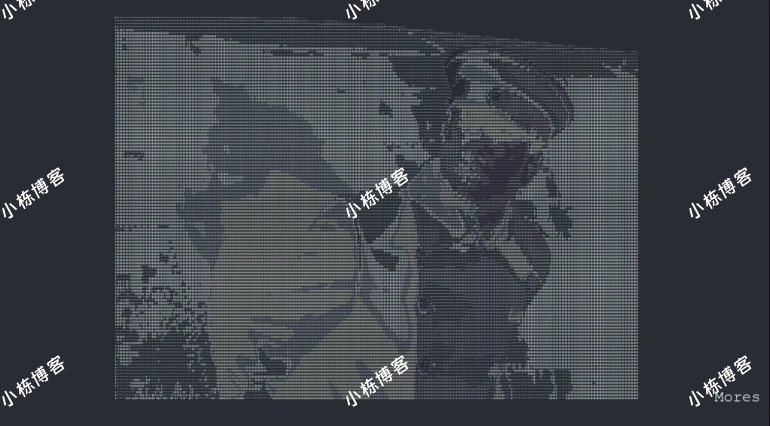
这段代码到底干了啥
"少帅下飞机"是一段在网上传得很广的梗视频。这篇分享的,是一个用 Python 把视频实时转成 ASCII 字符画、并在全屏窗口里逐帧播放的小脚本——你扔进去一个 mp4,它就给你放一段字符版的"少帅下飞机"。
整个脚本不长,核心思路是这么几步:
- 逐帧读取视频:用 OpenCV 的
cv2.VideoCapture把视频一帧帧抠出来。 - 缩放 + 灰度化:每一帧先按窗口宽度等比缩放(高度额外乘 0.55,是为了补偿等宽字符"瘦高"带来的比例失真),再转成灰度图。
- 像素映射字符:把每个像素的灰度值,按亮度映射到
"@%#*+=-:. "这串字符上——越暗的像素用越"重"的字符,越亮的用越"轻"的字符,这样明暗关系就还原出来了。 - 渲染到窗口:把拼好的字符串塞进 tkinter 的
Label逐帧刷新,字符画就动起来了。
几个值得注意的细节:
ImageEnhance.Contrast把对比度拉到 1.5,字符画的明暗层次会更分明,不然容易糊成一片。- 用
label.update_idletasks()+label.update()手动刷新,而不是完全交给mainloop,这样播放节奏能跟着视频帧走。 - 播放完会自动
webbrowser.open打开一个网页——这种"小彩蛋"按需删掉即可。
运行前先装好依赖 opencv-python 和 pillow,把视频放进脚本同级的 Mores 文件夹,直接跑就行。完整代码如下:
代码如下
import cv2
import os
from PIL import Image, ImageEnhance
import tkinter as tk
import webbrowser

ASCII_CHARS = "@%#*+=-:. "

def resize_image(image, new_width):
    (original_width, original_height) = image.size
    aspect_ratio = original_height / original_width
    new_height = int(aspect_ratio * new_width * 0.55)
    if new_width <= 0 or new_height <= 0:
        print(f"Invalid dimensions: new_width={new_width}, new_height={new_height}")
        return image
    return image.resize((new_width, new_height))

def enhance_image(image):
    enhancer = ImageEnhance.Contrast(image)
    return enhancer.enhance(1.5)

def grayify(image):
    return image.convert("L")

def pixels_to_ascii(image):
    pixels = image.getdata()
    ascii_str = ""
    for pixel in pixels:
        index = pixel // (256 // len(ASCII_CHARS))
        if index >= len(ASCII_CHARS):
            index = len(ASCII_CHARS) - 1
        ascii_str += ASCII_CHARS[index]
    return ascii_str

def convert_frame_to_ascii(frame):
    if frame is None:
        print("Frame is None")
        return ""
    image = Image.fromarray(cv2.cvtColor(frame, cv2.COLOR_BGR2RGB))
    new_width = root.winfo_width() // 6
    image = resize_image(image, new_width)
    if image is None:
        return ""
    image = enhance_image(image)
    image = grayify(image)
    ascii_str = pixels_to_ascii(image)
    img_width = image.width
    ascii_lines = [ascii_str[i:i + img_width] for i in range(0, len(ascii_str), img_width)]
    return "n".join(ascii_lines)

def update_frame(video_path, label):
    cap = cv2.VideoCapture(video_path)
    if not cap.isOpened():
        print(f"Error opening video file: {video_path}")
        return
    while True:
        ret, frame = cap.read()
        if not ret:
            print("No more frames to read or error reading frame.")
            break
        ascii_str = convert_frame_to_ascii(frame)
        label.config(text=ascii_str)
        label.update_idletasks()
        label.update()
    cap.release()
    label.master.quit()
    webbrowser.open("https://blog.biekanle.com/")

def play_video_as_ascii(video_path):
    global root
    root = tk.Tk()
    root.title("ASCII Video Player")
    root.attributes('-fullscreen', True)
    label = tk.Label(root, font=("Courier", 5), justify='left', bg='#282c34', fg='white')
    label.pack(fill=tk.BOTH, expand=True)
    logo_label = tk.Label(root, text="Mores", font=("Courier", 30), bg='#282c34', fg='white')
    logo_label.place(relx=0.99, rely=0.95, anchor='se')
    root.after(0, update_frame, video_path, label)
    root.mainloop()

if __name__ == "__main__":
    video_folder = "Mores"
    if not os.path.exists(video_folder):
        print(f"视频文件夹不存在: {video_folder}")
    else:
        for filename in os.listdir(video_folder):
            if filename.endswith(".mp4") or filename.endswith(".avi"):
                video_path = os.path.join(video_folder, filename)
                print(f"Playing {filename} as ASCII art...")
                play_video_as_ascii(video_path)


正在读取登录状态…